
 流星直播官网版5.7.2
 头版头条安卓版v3.53.7
 大学作业考试答案3.2.3
 学习丹麦语6.7
 微信分身ios自定义版4.36
 查的准v.1.56
Calc 3 is the most powerful and elegant calculator in the market. Its functions are easy to use, its design is friendly for everyone and it is made to serve plenty of calculations in daily life. Additionally the feature-rich and powerful capabilities also make it ideal for scientists, engineers and students.
FEATURES:
3 WAYS OF INPUT:
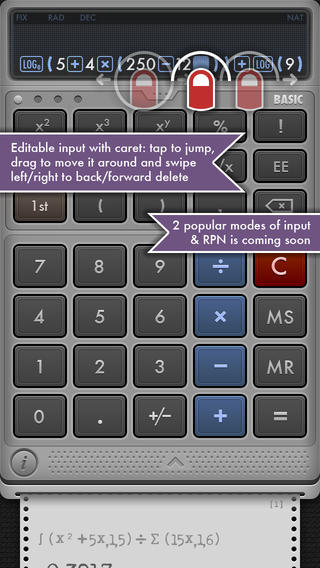
+ Natural expression or Formula (NAT): expressions are input in the natural order as written in the textbooks
+ Immediate Execution (IE): calculations are executed after each key press, similar to various popular calculators, such as:
Windows system calculator, Mac system calculator, several basic models of Casio calculators, etc.
+ Reversed Polish Notation (RPN)
CARET: tap anywhere on the input display to put the caret at that position, drag it to move it around, swipe left/right to back/forward-delete. This unique feature is extremely useful for typing long expressions and quick typos fix without re-entering the whole input again.
POWERFUL CALCULATION ENGINE: supports computing very large and small numbers. If you don&39;t believe, try it yourself with the following expressions in your computer or personal calculator, to see if they can compute 1000! or 2^(-1000)
Beautiful and super easy-to-use interface with exciting animation and sound effects
Supports 3 types of output display, including: FIXED, NORMAL, SCIENTIFIC
Supports 3 types of angle measurements: DEGREE, RADIAN, GRADIAN
HISTORY LOG TAPE: in addition to saving a log of every calculation, this feature is also useful for re-using the expressions and results, and exporting them via email
FORMULA VIEWER: helps you see equations exactly like in the textbooks. This is extremely helpful to verify a long and complex equation
FUNCTION QUICK VIEW: some functions such as integral or derivative take several arguments and require a strict order, hence they are hard to remember. Just tap & hold on that function button to open up a quick view showing a description and an example. No more learning, remembering and mistakes.
COPY & PASTE: helps you bring numbers back and forth between Calctimate and other apps, such as note or documents
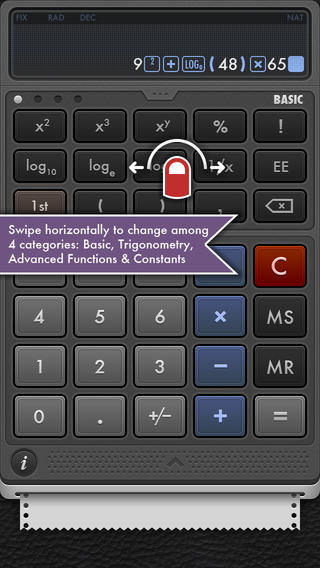
More than 50 popular and advanced functions, categorized into four modules: Basic, Trigonometry, Advanced Functions and Constants:
+ BASIC: square, cub, y-th power, percentage, factorial, logarithm base 10-e-2, reciprocal, engineering exponent, square root, cube root, y-th root, modulo, absolute, power of 10-e-2, round, random
+ TRIGONOMETRY: sine, reverse sine, cosine, reverse cosine, tangent, reverse tangent, cosecant, reverse cosecant, secant, reverse secant, hyperbolic sine, reverse hyperbolic sine, hyperbolic cosine, reverse hyperbolic cosine, hyperbolic tangent, reverse hyperbolic tangent
+ ADVANCED FUNCTIONS: derivative, integral, evaluation, root finder, product, sum, fibonacci, permutation, combination, greatest common divisor, least common multiple
+ CONSTANTS: hundreds of popular constants used in Mathematics, Physics and Chemistry
Other features:
+ Universal binary, download once and run all on iPod touch, iPhone, iPhone5 and iPad
+ Retinal display, beautiful graphics on iPhone 4/4S/5/5S and retina iPad
+ iPhone 5 layout support.
+ Set of beautiful background to choose from.
版本 3.1.0 中的新功能
Changed the app name
Removed banner ad for iPad
Added interstitial ads
Fixed several minor bugs a










 造梦西游之黎尤浩劫篇唐三藏通关攻略
 造梦西游之黎尤浩劫篇灵宠大全
 未定事件簿新春活动有哪些
 造梦西游之黎尤浩劫篇怎么玩
 斗破苍穹手游摘星老鬼怎么样
 永劫无间方诺攻略
 斗破苍穹手游紫妍怎么样
 方舟生存进化棘背龙吃什么驯服
 吉星派对局内任务怎么完成
 未定事件簿故城长燃的薪火怎么玩
 绝区零2.6版本内容介绍
 潮汐守望者武圣关羽怎么样
 全民祖玛公测时间什么时候
 凡人灵境游公测时间介绍
 火影忍者新春主题活动有哪些
 第五人格春节主题1V4限时玩法介绍
 百战群英手游征战四方怎么玩
 星绘友晴天编辑器怎么用